In 2020, 75% of companies around the world experienced a phishing attack. Phishing remains one of the biggest dangers to your business’s health and wellbeing because it’s the main delivery method for all types of cyberattacks.

One phishing email can be responsible for a company succumbing to ransomware and having to face costly downtime. It can also lead a user to unknowingly hand over the credentials to a company email account that the hacker then uses to send targeted attacks to customers.

Phishing takes advantage of human error, and some phishing emails use sophisticated tactics to fool the recipient into divulging information or infecting a network with malware.

Mobile phishing threats skyrocketed by 161% in 2021.

Your best safeguards against the continuous onslaught of phishing include:

  • Email filtering
  • DNS filtering
  • Next-gen antivirus/anti-malware
  • Ongoing employee cybersecurity awareness training

To properly train your employees and ensure your IT security is being upgraded to meet the newest threats you need to know what new phishing dangers are headed your way.

Here are some of the latest phishing trends that you need to watch out for in 2022.

Phishing Is Increasingly Being Sent via Text Message

Fewer people are suspicious of text messages than they are of unexpected email messages. Most phishing training is usually focused on the email form of phishing because it’s always been the most prevalent.

But cybercrime entities are now taking advantage of the easy availability of mobile phone numbers and using text messaging to deploy phishing attacks. This type of phishing (called “smishing”) is growing in volume.

People are receiving more text messages now than they did in the past, due in large part to retailers and service businesses pushing their text updates for sales and delivery notices.

This makes it even easier for phishing via SMS to fake being a shipment notice and get a user to click on a shortened URL.

Business Email Compromise Is on the Rise

Ransomware has been a growing threat over the last few years largely because it’s been a big money-maker for the criminal groups that launch cyberattacks. A new up-and-coming form of attack is beginning to be quite lucrative and thus is also growing.

Business email compromise (BEC) is on the rise and being exploited by attackers to make money off things like gift card scams and fake wire transfer requests.

What makes BEC so dangerous (and lucrative) is that when a criminal gains access to a business email account, they can send very convincing phishing messages to employees, customers, and vendors of that company. The recipients will immediately trust the familiar email address, making these emails potent weapons for cybercriminals.

Small Businesses Are Being Targeted More Frequently With Spear Phishing

There is no such thing as being too small to be attacked by a hacker. Small businesses are targeted frequently in cyberattacks because they tend to have less IT security than larger companies.

43% of all data breaches target small and mid-sized companies, and 40% of small businesses that become victims of an attack experience at least eight hours of downtime as a result.

Spear phishing is a more dangerous form of phishing because it’s targeted and not generic. It’s the type deployed in an attack using BEC.

It used to be that spear-phishing was used for larger companies because it takes more time to set up a targeted and tailored attack. However, as large criminal groups and state-sponsored hackers make their attacks more efficient, they’re able to more easily target anyone.

A result is small businesses receiving more tailored phishing attacks that are harder for their users to identify as a scam.

The Use of Initial Access Brokers to Make Attacks More Effective

We just discussed the fact that large criminal groups are continually optimizing their attacks to make them more effective. They treat cyberattacks like a business and work to make them more profitable all the time.

One way they are doing this is by using outside specialists called Initial Access Brokers. This is a specific type of hacker that only focuses on getting the initial breach into a network or company account.

The increasing use of these experts in their field makes phishing attacks even more dangerous and difficult for users to detect.

Business Impersonation Is Being Used More Often

As users have gotten savvier about being careful of emails from unknown senders, phishing attackers have increasingly used business impersonation. This is where a phishing email will come in looking like a legitimate email from a company that the user may know or even do business with.

Amazon is a common target of business impersonation, but it also happens with smaller companies as well. For example, there have been instances where website hosting companies have had client lists breached and those companies sent emails impersonating the hosting company and asking the users to log in to an account to fix an urgent problem.

More business impersonation being used in phishing attacks mean users have to be suspicious of all emails, not just those from unknown senders.

Is Your Company Adequately Protected from Phishing Attacks?

It’s important to use a multi-layered strategy when it comes to defending against one of the biggest dangers to your business’s wellbeing. Get started with a cybersecurity audit to review your current security posture and identify ways to improve.


Featured Image Credit

This Article has been Republished with Permission from .

It’s not unusual to change a mobile number from time to time. For example, when you move, you may want a number that is local to the area you just moved to. Companies also may end up recycling mobile numbers throughout their staff as people come and go.

If you don’t properly detach your mobile phone number from all the accounts it’s used with, you can leave yourself open to identity theft, credit card fraud, and other crimes.

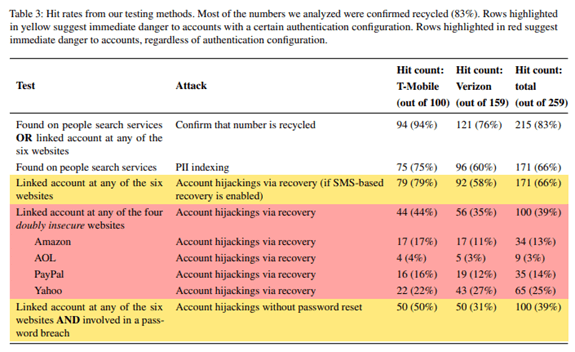
In a 2021 Princeton University study, it was found that 66% of mobile numbers listed as available by major mobile service providers were still connected to accounts on popular sites (Amazon, PayPal, etc.). 

So, after the former owners had turned in the number, it was available for someone else to use when signing up for mobile service. And that number was still being used on the former owner’s cloud accounts, allowing those accounts to easily be breached.

Because our mobile numbers are connected to much of our online and offline life, it’s important to take certain steps to ensure that you don’t leave yourself at risk when recycling your phone number.

Change Your Phone Number for Online Accounts

We all generally have more online accounts than we immediately remember. The average person must juggle 100 passwords, and most of those passwords will be to a website or cloud app service of some kind.

The first thing you want to do is begin visiting your online accounts and cloud applications to update your mobile phone number. Many of these apps now use a text message to your number as a form of verification if you’ve lost your password.

You want to ensure any password reset messages go to you and not someone that has requested your old number for the express purpose of identity theft or account compromise.

Change Your Number for Social Media Accounts

Technically, a social media account is also an online account, but many people think of them as a separate entity. When a Facebook or LinkedIn account is compromised, the hacker often will send social phishing messages out to your friend connections to try to gain access to sensitive data or scam them out of money.

Make sure to change the phone number listed in your social media accounts. If you are using WhatsApp, which is tied directly to your mobile number, make sure to follow their instructions on changing your number so your communications will remain secure.

Change Your Phone Number for Service Providers That Send You Texts

Text messaging is beginning to replace email for many types of communications. This includes things like shipping notices, confirmations of payments from utility companies, appointment reminders, and sale notices from retailers.

This puts you more at risk if you change your mobile number because the texts you receive from various service providers can be used for identity theft.

Make sure to connect with any services you use that contact you by calling or texting your mobile number to update your information. These offline services could be a:

  • Plumbing or HVAC company
  • Dentist or doctor’s office
  • Pharmacy
  • Local retailer
  • Utility company

Double Check All Your Multi-Factor Authentication Prompts

One of the big dangers of having a stranger able to receive your text messages is that they could have access to your codes for multi-factor authentication (MFA).

MFA is designed as a safeguard to help prevent an account breach, even if the perpetrator has your username and password. But if the criminal gets the MFA codes sent to your old number, they can easily get in and change your password, locking you out of your own account.

As you go through the process to update your mobile number in your online accounts, double-check the MFA prompt for any that use this form of authentication security. You want to make sure it’s been properly changed to send a message to your new number.

Review Your Text Message History for Anything You’ve Missed

Inevitably, there will be online accounts or service providers that you’ve missed. For example, that place you always order flowers for on a loved one’s birthday every year but never visit at other times.

Scroll through your text message history to find any other accounts that you may have forgotten to update.

Text Friends, Family & Colleagues from the New Number

Once your online security is taken care of, you want to stop friends, family, and colleagues from accidentally texting your old number. This can happen in both one-on-one and group SMS chats.

Send a text message from your new number asking them to immediately update your contact with that number when they receive it. Then go the additional step by asking them to delete any messages that used your old phone number. This can help prevent them from accidentally grabbing that message instead of your new one when texting you in the future.

How Secure Is Your Mobile Device?

Mobile devices are increasingly being attacked by malware and phishing. Is your device properly secured? Don’t leave yourself at risk, request a mobile security check to protect your personal data and identity.


Featured Image Credit

This Article has been Republished with Permission from .
The global damage of cybercrime has risen to an average of $11 million USD per minute, which is a cost of $190,000 each second.

60% of small and mid-sized companies that have a data breach end up closing their doors within six months because they can’t afford the costs. The costs of falling victim to a cyberattack can include loss of business, downtime/productivity losses, reparation costs for customers that have had data stolen, and more.

You may think that this means investing more in cybersecurity, and it is true that you need to have appropriate IT security safeguards in place (anti-malware, firewall, etc.). However, many of the most damaging breaches are due to common cybersecurity mistakes that companies and their employees make.

The 2021 Sophos Threat Report, which looked at thousands of global data breaches, found that what it termed “everyday threats” were some of the most dangerous. The report stated, “A lack of attention to one or more aspects of basic security hygiene has been found to be at the root cause of many of the most damaging attacks we’ve investigated.”

Is your company making a dangerous cybersecurity mistake that is leaving you at high risk for a data breach, cloud account takeover, or ransomware infection?

Here are several of the most common missteps when it comes to basic IT security best practices.

Not Implementing Muti-Factor Authentication (MFA)

Credential theft has become the top cause of data breaches around the world, according to IBM Security. With most company processes and data now being cloud-based, login credentials hold the key to multiple types of attacks on company networks.

Not protecting your user logins with multi-factor authentication is a common mistake and one that leaves companies at a much higher risk of falling victim to a breach.

MFA reduces fraudulent sign-in attempts by a staggering 99.9%.

Ignoring the Use of Shadow IT

Shadow IT is the use of cloud applications by employees for business data that haven’t been approved and may not even be known about by a company.

Shadow IT use leaves companies at risk for several reasons:

  • Data may be used in a non-secure application
  • Data isn’t included in company backup strategies
  • If the employee leaves, the data could be lost
  • The app being used might not meet company compliance requirements

Employees often begin using apps on their own because they’re trying to fill a gap in their workflow and are unaware of the risks involved with using an app that hasn’t been vetted by their company’s IT team.

It’s important to have cloud use policies in place that spell out for employees the applications that can and cannot be used for work.

Thinking You’re Fine With Only an Antivirus Application

No matter how small your business is, a simple antivirus application is not enough to keep you protected. In fact, many of today’s threats don’t use a malicious file at all.

Phishing emails will contain commands sent to legitimate PC systems that aren’t flagged as a virus or malware. Phishing also overwhelmingly uses links these days rather than file attachments to send users to malicious sites. Those links won’t get caught by simple antivirus solutions.

You need to have a multi-layered strategy in place that includes things like:

  • Next-gen anti-malware (uses AI and machine learning)
  • Next-gen firewall
  • Email filtering
  • DNS filtering
  • Automated application and cloud security policies
  • Cloud access monitoring

Not Having Device Management In Place

A majority of companies around the world have had employees working remotely from home since the pandemic, and they’re planning to keep it that way. However, device management for those remote employee devices as well as smartphones used for business hasn’t always been put in place.

If you’re not managing security or data access for all the endpoints (company and employee-owned) in your business, you’re at a higher risk of a data breach.

If you don’t have one already, it’s time to put a device management application in place, like Intune in Microsoft 365.

Not Providing Adequate Training to Employees

An astonishing 95% of cybersecurity breaches are caused by human error. Too many companies don’t take the time to continually train their employees, and thus users haven’t developed the skills needed for a culture of good cybersecurity.

Employee IT security awareness training should be done throughout the year, not just annually or during an onboarding process. The more you keep IT security front and center, the better equipped your team will be to identify phishing attacks and follow proper data handling procedures.

Some ways to infuse cybersecurity training into your company culture include:

  • Short training videos
  • IT security posters
  • Webinars
  • Team training sessions
  • Cybersecurity tips in company newsletters

When Did You Last Have a Cybersecurity Checkup?

Don’t stay in the dark about your IT security vulnerabilities. Schedule a cybersecurity audit to uncover vulnerabilities so they can be fortified to reduce your risk.


Featured Image Credit

This Article has been Republished with Permission from .

Hardly any phone call system in a business beats VoIP when it comes to efficiency and flexibility. However, it’s not immune to cyberattacks. Discover how you can secure your VoIP ASAP.

What kind of communication system are you using for your business?

I asked because many modern-day businesses have now switched to the Voice Over Internet Protocol (VoIP). This technology allows employees to perform voice calls using only their internet connection. 

It’s often a wise choice considering that using VoIP comes with several benefits to a business.

Among its benefits include lower operating costs, greater convenience than traditional services, increased accessibility, higher scalability, and the ability to multitask. VoIP also comes with advanced features for teams of all sizes, is completely portable, and offers superior voice quality. 

However, VoIP systems also have limitations, with cyberattacks being their number one downside. 

The good news is that it’s possible to protect a business’s VoIP system from hackers. And if you already implemented this in your business, it’s not too late to secure it.

Read on to discover the most common threats to your network and tips on preventing them.

The Need for VoIP Protection

All VoIP systems require a stable internet connection to function properly. Unfortunately, their reliability on the internet makes them vulnerable to various security issues.

Some of the most frequent ones include:

Security Issue #1. Denial of Service

Denial of Service (DoS) is a common threat to VoIP systems comprising attacks designed to shut down a machine or network and make it inaccessible for use. 

When this happens, legitimate users of VoIP technology may not be able to access their information systems and devices. And call centers can be affected by lower call quality, uptime, and latency. 

Security Issue #2. War Dialling

War dialing is an attack that controls the company’s private branch exchange (PBX) and scans for other phone networks. This means hackers can dial numbers and connect to modems and other extensions.

Security Issue #3. Toll Fraud

Toll fraud is a threat that consists of making calls to outside lines from a company’s existing system. 

For example, hackers will dial costly international numbers intending to rack up toll charges to your business. 

Security Issue #4. Phishing

This is a common threat wherein attackers send fraudulent messages designed to trick victims into revealing sensitive information. Often, the unsuspecting victims would divulge information about passwords, internal IP networks, and similar data. 

Security Issue #5. Malware

It’s a threat where attackers install malicious software via email or phone. A file or code gets delivered over a network and has the goal of infecting, stealing, or exploring the information contained within a system. 

After infecting the system with malware, VoIP hackers can enter your network and access critical business information. 

Security Issue #6. Call Interception

The call interception attacker uses unsecured networks to intercept the Session Initiation Protocol (SIP) traffic that serves to initiate, maintain, and terminate real-time voice and video sessions. 

A victim of a call interception attack can be redirected to another line hosted by the hacker, for example.

6 Tips for Boosting VoIP Security

Given the variety of threats imposed by attackers on VoIP systems, it’s necessary to optimize your VoIP security ASAP. 

Here are 6 valuable tips to get you started.

Tip #1. Set Up a Firewall 

Secure firewalls are necessary for all VoIP systems. It’s important to make your VoIP software and hardware firewalls scan information that goes in and out of the system and ensure it’s secure. 

If spam or a threat comes your way, the firewall will identify and gain control over it, shielding your system shielded from the attack.

Also, a good firewall will allow the data packets you send to travel unhindered. 

Tip #2. Use Strong Passwords 

Your VoIP system is no different from any other software or platform you use for handling sensitive information. For this reason, it needs to be protected with strong and regularly updated passwords. 

Aim for combinations of at least 12 characters, including numbers, upper- and lower-case letters, and special symbols. And for ultimate protection, go for passwords consisting of a random character series. 

It’s crucial to set a password as soon as you configure your VoIP system. Otherwise, you’re likely to forget about it later. 

Also, remember that some VoIP phones come with pre-set passwords, often available publicly. That’s why you should change yours as soon as you get a chance. 

Ideally, try to change your passwords every three months.

Tip #3. Restrict Calling

Many VoIP attacks happen due to toll fraud. So, if your business runs locally, there’s no need to have the international call option enabled. This allows you to be on the safe side and avoid paying expensive bills you weren’t even responsible for making. 

You can let your VoIP service block 1-900 numbers to avoid toll fraud. 

Tip #4. Encourage Your Team to Report Suspicious Behaviour 

Many of the VoIP attacks arrive due to irresponsible behavior. To prevent this from happening, educate your team on how they can best do their job without affecting the system’s security. 

For starters, they should know how to spot unusual network activity, handle passwords, and report suspicious behavior. They should also report ghost calls and missing voicemails whenever received. Staff also shouldn’t store voicemail for too long. 

The reality is that sometimes, cybersecurity training during onboarding often isn’t enough. That’s why you should do periodical training to keep your VoIP safe at all times. 

Tip #5. Deactivate Web Interface Use 

Ideally, you should deactivate the web interface used for your VoIP system. 

Why?

Using phones on a desktop computer opens an area of weakness to attackers. It’s enough for a single phone user falling prey to leave the whole system exposed to an external party. All your data can be stolen in text format as a result. 

So, unless it’s absolutely necessary for you to use the web interface, be sure to secure it very strictly.

Tip #6. Use a VPN for Remote Workers

Virtual Private Networks (VPNs) are great software that encrypts traffic regardless of your employee’s location. 

You can set up such a network for your remote staff to prevent data leaks and breaches. The good news is that using this service won’t degrade the call quality. 

(Re)Gaining Control Over Your VoIP Security

VoIP systems are a fantastic alternative to landlines. After all, they offer many more features and flexibility at a fraction of the cost. However, their reliability on the internet also makes them susceptible to cyberattacks. 

If you have just set up a VoIP system for your company or are thinking of starting one, securing it should be your number one priority. Don’t risk falling prey to toll fraud, malware, phishing, and other attacks. Take some time to secure your business by following the tips from this article. 

And if you need more help to implement these changes or would like to further discuss securing your business’s VoIP system, reach out to us and we can set up a 10-15-minute chat. 


Featured Image Credit

This Article has been Republished with Permission from .

Printing devices are often overlooked when it comes to security. But the reality is, cybercriminals can hack your printer to get confidential information.

Your printer is probably the last piece of computer equipment you thought needed protection from cybercriminals. 

But the truth is very different. 

Attackers actively try to locate the weakest links in security to gain access to and exploit valuable data. And among the weakest links is the printer.

The thing with printers nowadays is that they have access to your devices, network, and the internet. This new open-access functionality makes them an ideal target for cyberattacks. 

Unfortunately, many business owners overlook the importance of securing their printers and mainly focus on computers and mobile phones. 

Most people still perceive printers as internal devices that serve basic functions. For this very reason, they are an easy target for cybercriminals.

Other than performing unauthorized print jobs, hackers can access confidential information as well as all connected computers and networks all through a printer. 

You may also not be aware of the amount of valuable data your printer can store about you – tax files, bank details, financial records, employee information, personal information, etc. All a hacker needs to do is get into the operating system of your printer, and they can collect this sensitive data. 

If you’ve just realized the importance of securing your printer, keep reading. This article shares eight tips to help you do just that.

The 8 Tips

Tip #1. Make Sure Your Printers Are Configured Correctly

Many things can make a printer vulnerable to cyber threats and security breaches. So, you want to get the basics right to ensure the attacks don’t happen to you. 

To start with, make sure to change the default password on your printer. Since anyone can access a printer remotely, a simple “123456” code won’t suffice. 

Second, make sure you’re using your own router to print files remotely. Never connect to “Guest” networks.

Tip #2. Inspect Print Trays Regularly

This one is a no-brainer, but everyone could use it as a reminder. Make sure to check your print trays and get rid of unused pages carrying sensitive information. There’s no easier way to prevent data leaks than this. 

Alternatively, you can get a shredder for your office and shred the papers you don’t want anyone to see.

Tip #3. Install Malware and Firmware Updates

Invest time and effort to ensure that your malware and firmware protection are up to date and can handle all types of hacks. 

The good news is that many printers come with pre-built malware protection. 

HP, for example, installs the HP “SureStart” software in their printers that monitors approaching targets when the printer is on. The software can shut down the device if an attack comes its way. This is a great way to prevent attacks from spreading further within the network. 

Tip #4. Limit Access to the Network

Unprotected printers in a network are an extremely easy target for cybercriminals. Sure, businesses and offices require printers to access networks to perform remote prints. But if you can do the job by disabling the network access, make sure you do that. 

If not, tweak the printer and network settings to only allow the device to take print jobs from the network you trust. This will help avoid outside interference and security breaches. 

Tip #5. Update Your Printers

Updating a printer is equally as important as updating your phone to the latest software. Much in the way iOS developers look for bugs and fix them in a new update, printer manufacturers work toward known device vulnerabilities and update the software for added protection. 

Look for printer updates so you can easily overcome known threats to the printer. Ideally, update your printers every quarter to get the most out of the security benefits. 

Tip #6. Install a Firewall

If you run an office, chances are you already have a firewall. But in case you missed this requirement, now’s the time to do it. 

Using a reliable firewall helps keep printers safe from cybercriminals. 

Your computers most likely come with pre-built firewalls, and all you need to do is keep them enabled. But there are also specialized firewalls for homes and offices that offer advanced security and make it virtually impossible for anyone to break in. 

Tip #7. Encrypt Your Storage

Printers with shared networks can perform distance printing. And when a print job is in transit and travels from a computer to a printer, hackers can intercept the data and exploit it. 

To keep this from happening, encrypt your print jobs. Also, make sure the sensitive data on your printer’s hard or internal drive is encrypted as well.

Keep in mind that when you print a document, that file is often stored as an image within the printer and makes it an easy target for hackers. It’s why you should use an encryption tool to protect your data. Luckily, many modern printers have this tool pre-built. 

You can use the tool to set up a secure password that allows printer storage encryption, remove user IDs and ex-employee access, delete documents from the print queue once they’re printed, and much more.

Tip #8. Educate Your Employees

If you work in an office, chances are you aren’t the only person using the printer. Everyone that has access to it needs to be aware of the responsibilities that come with its usage. Make sure to talk to your employees about ways to ensure both the physical and virtual safety of the printers. 

Your staff should also be careful when using their mobile devices to print, as smartphones are easier to hack. Explain to them what phishing scams are and how they can avoid being the victim. 

Finally, make sure it’s clear to them how they can use confidential information in your company.

It’s Time to Ensure Printer Security

Printers are the most overlooked devices when it comes to security. Given how most business owners consider them as merely internal devices whose sole function is to print documents, it’s no wonder they are a weak spot security-wise. 

Whether you use printers in your office or at home, take a moment to see how you can enhance its security before your next printing job.

As cybercriminals are a growing concern, each of us is responsible for protecting our data. Luckily, the tips from this article will help you bring your printer’s security to another level. 

If you need more insight into protecting the security of your printers, get in touch with us today. We can set up a 10-15-minute chat to discuss how you can implement these changes and keep cybercriminals away. 


Featured Image Credit


This Article has been Republished with Permission from .
Your data is pivotal to running a successful company. If you don’t have proper security measures in place, hackers can easily steal your data and take you out of business.

Cybercriminals might be the biggest threat facing your company. Besides gaining access to your money and accounts, they can also take over critical software, preventing you from collaborating with clients. 

Any organization can fall victim to hacking. However, small and medium businesses are particularly at risk. 

Why?

Too often, their owners don’t always address cybersecurity when launching their company. Sometimes, they even just hire the first IT service provider they see. They also don’t know how to shield themselves from online attackers, making them low-risk targets. 

As a result, these organizations often go under due to the loss of sensitive data. It isn’t a risk you can take. 

To help mitigate it, this article will introduce you to the various types of hackers and explain how to protect your business from them.

The 5 Types of Hackers to Watch Out For

Here’s a quick list of potential hackers, depending on what they’re after: 

#1. Hackers Who Are After Personal Information

Many hackers are dying to get their hands on the personal information of your clients and employees. It includes birth dates, financial data, and social security numbers. 

Social security numbers might be the most valuable asset they want to get ahold of since cybercriminals can use them for various purposes. For instance, they can perform tax fraud, open credit accounts, and make other significant identity breaches. 

In addition, financial data can be utilized for fraudulent activities and purchases, especially if it lacks robust digital security systems. 

#2. Hackers Who Want to Get Into the Digital Infrastructure

Storage and data servers are expensive – and hackers know that.

In order for them to cut costs, hackers may aim to store their applications and data on your infrastructure instead. The better your infrastructure, the more likely cybercriminals are to target it. This can strain your network to the limits and have devastating effects on your business. 

Unsurprisingly, tech companies are some of the most common victims of this type of hacking. 

The common indicators that a hacker has tapped into your digital infrastructure include:

  • Running out of storage faster than usual
  • Your network suffers slowdowns 
  • You may have unknown devices on your network. 

#3. Hackers Who Are After Confidential Information 

Few business aspects are as important as your intellectual property (IP). Your products and services enable you to stand out from the competition and strike a chord with the target audience. 

A huge problem arises if hackers steal the design of your upcoming product before you launch it or submit your patent. A competitor may obtain the information, allowing them to hit the market first and undercut your sales.

#4. Hackers Who Want to Get Account Data

Sure, you and your IT service provider might have done enough so that hackers might not be able to obtain financial data. But are your employees’ accounts secure? 

If hackers compromise them, they may let them run scams and gain information to disrupt your operations. 

For example, losing CEO login credentials can be devastating. Besides granting hackers access to sensitive information, it also helps them impersonate the CEO. In return, they can solicit information from employees or clients and halt your operations. 

This data breach can lead to widespread confusion, tarnishing your reputation. 

#5. Hackers Who Aim to Have Network Control

In some cases, hackers aren’t after data. Instead, they want to gain control of the entire network. And to make it happen, they launch ransomware attacks. 

These activities enable them to lock you out of the system and make data inaccessible until you pay a ransom. They’re typically initiated through spam, phishing emails, and online ads. 

The average ransom amount stands at approximately $30,000, but the loss caused by business disruption is much more significant. 

How to Protect Your Business

Now that you know how hackers can compromise your company, let’s check out 5 effective ways to protect yourself:

Way #1. Investing in Security Resources

A key factor ignored by many owners is the amount of money and time devoted to cybersecurity. Avoid this mistake by allocating enough resources to set up solid defensive measures. Make sure to invest in a reliable IT service provider to help you out.

This way, your online accounts, hardware, and network should be more secure. 

Way #2. Training Your Team

Most security systems have weaknesses. And their employees are usually the biggest ones. 

For this reason, HR managers and CEOs should ensure their staff follows optimal security measures, both in-office and at home. They must all remember that any phone or laptop they use for work can be a weak point and entryway for hackers. 

To introduce your employees to the best security practices, consider arranging security education and training for a month once a year. You can talk about different aspects of your company and the steps necessary to deter cyber criminals, for example. 

Sound education can go a long way in promoting a healthy security culture. 

Way #3. Adding Authentication

There are many valuable tools you can use to fend off hackers. One of them is two-factor authentication (2FA) – a simple yet effective weapon against scammers. 

This measure requires each user to verify their identity to access your system. You could use it on all business-related accounts to reduce the chances of cybercrime. 

Furthermore, encourage your team members to activate 2FA on personal accounts. This way, they’ll be more likely to follow appropriate security practices, reducing the risk of compromised devices and data breaches. 

Way #4. Leveraging Software

Computer viruses are another go-to tool for hackers. And a great way to deal with them is to incorporate antivirus software. 

Make sure your built-in antivirus software is up to date. Also, you can consider a corporate package from trusted companies like BitDefender, Norton, McAfee, and Total AV. 

Each machine that can access work resources should rely on this software. Plus, the user should conduct weekly antivirus scans to lessen the chances of computers getting infected by a virus.

Way #5. Performing Security Checks

Checking your system is vital for optimal cybersecurity. Solid antivirus software is practical, but you shouldn’t disregard manual scans. It’s crucial that your IT service provider does this periodically.

More specifically, check who’s accessed your network and make sure each point of access is authorized. Any suspicious activity must be reviewed and rooted out. Otherwise, these red flags can prove fatal for the company. 

Stay on the Safe Side

Battling hackers may not be the most exciting part of running a business. However, neglecting cybersecurity turns your company into a sitting duck for scammers. You may lose money, data, and your reputation might suffer irreparable damage. 

While there isn’t a bulletproof solution, adopting the outlined tactics should be a strong starting point. 

Contact us today if you want to discuss your cybersecurity in greater detail and pinpoint potential risks. We can arrange a quick, non-salesy chat and figure out ways to help you.


Featured Image Credit

This Article has been Republished with Permission from .

Your business can benefit a lot from working with an IT provider. However, you need to avoid several key mistakes when choosing your team.

Time spent on trying to figure out the technology you use in your business can be costly. While doing that, you can’t focus on your business needs, which can then result in poor customer satisfaction. 

This is where IT providers come into play. 

They enable you to outsource hardware and computing-related services, such as managed IT security and cloud computing. IT providers can also provide a robust IT infrastructure so that you can direct your attention to revenue-generating activities. 

While there are numerous IT providers to choose from, not all of them may accommodate your business’s specific needs. And integrating with the wrong team can raise your spending due to irrelevant services, recurring security issues, data backup problems, and downtime. 

Therefore, you need to be extra careful when selecting your team. The only way to avoid disappointment is to avoid these eight common mistakes when looking for the right IT provider. 

The Eight Mistakes

Mistake #1 – Insisting on the Newest Technology

Many advertisers want to trick you into believing that the latest technology will resolve all your issues. While the newest virtualization or cloud offerings can boost operations in many enterprises, they might not suit your business. 

Hence, don’t let the hype surrounding new products dazzle you. 

Carefully consider the results your IT provider will help you achieve and determine if the investment enables you to fulfill them. Your provider shouldn’t confuse you with state-of-the-art features – they should guide you and allow for seamless integration. 

Mistake #2 – Failure To Consider the Response Times

Determining the response times of your prospective IT providers is essential. You need to ask them how long they usually take to reply to queries and resolve problems. Be sure to gauge their onsite support efficiency, too. 

Not inquiring about their availability is another grave error. Your IT team should provide round-the-clock services, including specialists that will monitor your system. 

Constant monitoring and availability can help ensure you can detect IT issues early. With this, the provider can immediately administer patches and updates to safeguard against disasters. 

Furthermore, your IT provider should offer simple access to their desk support. You should be able to contact them via email, phone, and chat for instant guidance. 

Mistake #3 – Neglecting the Security Aspect

Disregarding the security features of your IT provider might be the most severe mistake. Teams with improper defense mechanisms can’t shield your system from cyberattackers, increasing the risk of losing data and access to resources. 

To avoid this, look for IT providers that can protect you from malware and other threats. They also need to prioritize protecting your business’s confidential data, like trade secrets and customer information. 

When it comes to specific security measures, your IT provider should have features that prevent data intrusions instantly upon detection. The list includes phishing attacks simulations, web content filtering, DNS security, endpoint protection, mobile device management, and dark web protection. 

In addition, responsible teams should eliminate point-of-sale and network intrusions before they compromise your system. Making sure they abide by security compliance and government regulations is also paramount. 

Mistake #4 – Forgetting the Budget

Many IT companies operate under pay-as-you-go pricing schemes. Although this helps you minimize upfront investment, adopting a large number of technologies simultaneously without considering the recurring costs can cripple your finances. 

Thus, think twice before signing on the dotted line. 

Research your providers thoroughly and draft your budget with professional assistance. These steps can prevent considerable frustration down the line. 

Mistake #5 – Not Determining Scalability

One of the biggest impediments to growing your company is choosing an IT provider with poor scalability. 

By contrast, scalable IT teams allow your business to evolve and grow. They can continually extend their services to accommodate your company’s goals, even if these goals change. 

Mistake #6 – Opting for a Non-Responsive Service Level Agreement 

Service level agreements (SLAs) hold IT providers accountable for their services. It establishes standards for responsibilities, quality, scope, and delivery time in writing. Without it, you’ll have no way of ensuring transparent collaboration. 

When selecting your IT provider, find one with a responsive agreement. It can help guarantee the SLA scales with their services while rendering continual improvement. 

Mistake #7 – Lack of Team Training and Feedback

The story doesn’t end once you’ve found and partnered with a trustworthy IT provider. New technologies won’t magically increase your bottom line and decrease outputs. 

To accomplish your goal, your employees will still need to understand how to use your new tech solutions. But bear in mind that not every team member may be able to grasp new tools easily. Some may even prefer the existing platforms.

Fortunately, you can hire IT experts to train them. These professionals should simplify any complex steps and advise your staff on making the most of your new investment. 

Also, some enterprises set up regular training but fail to monitor their team’s performance. This is a huge mistake, as it keeps you from assessing your employee’s response to new technologies. 

So, conduct questionnaires and other forms of feedback collection to determine and address any weaknesses.

Mistake #8 – Ignoring Experiences With Previous Clients

Choosing an IT provider is similar to buying standard products and services. Failure to check user reviews can lead to disappointment. 

To get a clear picture of your IT team’s capabilities, analyze their current and previous clients from similar industries. Look for reviews, testimonials, and ask the provider for a list of projects and references. 

After doing your due diligence, you should be able to tell whether an IT provider is an ideal match for your company. 

However, keep in mind that every IT team is different. For instance, they might be well-versed in the healthcare industry but have no experience working with retailers. That’s why as mentioned, stick to IT providers servicing your industry to get the best results. 

Find the Right Fit

Nobody wants to end up with a poor IT provider that can’t deliver great results, leaves your company open to cyberattacks, and causes other vulnerabilities. Your investment goes down the drain, and your operations suffer. 

Luckily, we can show you a way out. 

Let’s arrange a quick, 10-15-minute obligation-free chat. We can discuss more ways on how to find the right IT provider for you and ensure you get your money’s worth.


Featured Image Credit


This Article has been Republished with Permission from .
Making the most of your Microsoft 365 apps requires you to adopt appropriate security measures.

Microsoft 365 is one of the best collaboration and productivity tools around. It provides users with seamless communication, scalability and supports remote work with various features. The security is also solid due to a wide array of defense mechanisms. 

But this doesn’t mean you’re impervious to cyberattacks. 

Data leakage, unauthorized access, and malware can still jeopardize your system and offer ideal entry points for hackers. Should your business fall victim, the consequences can be dire, ranging from operational disruptions to severe reputational damage. 

The only way to fend off hackers is to take your Microsoft 365 data protection to the next level. And this article will list the 11 most effective security measures to help shield your data in Microsoft 365.

The 11 Effective Security Measures

Security Measure #1 – Activate Multi-Factor Authentication

Microsoft 365 users have just one method of verifying their identity when using a username and password. Unfortunately, many people don’t follow robust password protocols. If you’re doing the same, you’re exposing your organization to intrusions. 

That’s where multi-factor authentication (MFA) comes into play. 

It can boost your Microsoft 365 security with one-time passphrases or other factors to verify user identity. Best of all, this measure is easy to apply. 

However, enabling MFA should only be your first step. The next one is to activate Security Defaults, a Microsoft feature that enforces MFA in each administrator account. 

Another great idea is to implement MFA in all accounts without administrator permissions. It’s because these accounts can still endanger services and apps in your ecosystem. 

Security Measure #2 – Use Session Timeouts

Many employees fail to log out of their accounts and lock their mobile devices or computers. This can grant hackers unlimited access to enterprise accounts, enabling them to compromise your data. 

Incorporating session timeouts into internal networks and accounts automatically logs users out after a certain inactivity period. That means hackers can’t take over their devices and access sensitive information.

Security Measure #3 – Refrain From Public Calendar Sharing

Calendar sharing enables your employees to synchronize and share schedules with colleagues. While this facilitates team collaboration, it can also give hackers insight into your operations and vulnerable users. 

For example, if your security administrator is on vacation and this information is publicly available, attackers can use this window to launch malware. 

Security Measure #4 – Employ Advanced Threat Protection

Advanced threat protection (ATP) is a robust solution that recognizes and prevents advanced threats that usually bypass antivirus and firewall defenses. 

It grants access to a database that receives real-time updates, allowing users to understand the threats and integrate the data into their analysis. 

ATP notifies you about attacks, the severity, and the method that stopped them, regardless of the source. It’s especially effective at preventing phishing. 

It relies on machine learning and a massive database of suspicious sites notorious for malware delivery or phishing attempts. 

Security Measure #5 – Leverage Policy Alerts

Microsoft 365 lets you establish your policy notifications in the compliance center to meet your company’s security needs. For example, they send your employees tips on sending sensitive information whenever they’re about to send a message to a contact outside your network. 

These warnings can safeguard against data leaks while educating your team on safe data sharing methods. 

Security Measure #6 – Secure Your Mobile Access

Your team often uses smartphones to access work email, contacts, documents, and calendars, especially if they work remotely. So, securing their devices should be your top priority when protecting data. 

The best way to do so is to install Microsoft 365 mobile management features. They can let you manage your security policy, permissions, restrictions, and wipe crucial information from stolen or lost devices.

Security Measure #7 – Deactivate Legacy Protocol Authentication

It’s worth noting that legacy protocols don’t support several security features in Microsoft 365 that reduce the chances of intrusion, such as MFA. This can make them perfect gateways for adversaries who want to target your organization. 

That said, your best bet is to deactivate legacy protocols to mitigate risks. 

However, you may not want to disable legacy authentication if your team needs it for older email accounts. The good news is that you can still make your network safer by restricting access to users who don’t need this protocol. 

Security Measure #8 – Integrate Role-Based Access Control

Access management is a convenient security feature that can limit the flow of private information across your business. It allows you to establish the users who can access data in your company. 

For instance, you can minimize data leaks by preventing rank-and-file team members from reading and editing executive-level files.

Security Measure #9 – Rely on Unified Audit Log 

Unified audit log (UAL) includes logs from several Microsoft 365 services, such as Azure AD, SharePoint Online, OneDrive, and Microsoft Teams. Enabling it can give the administrator insight into malicious activity and actions that violate organizational policies. 

You may also want to incorporate your logs into an existing SIEM (Security Information and Event Management) tool. Doing so enables you to connect logs with current log monitoring and management solutions to reveal abnormal activity. Plus, it can improve the overall security of your Microsoft 365 suite. 

Security Measure #10 – Encrypt Emails

Encrypting sensitive data is often the last resort when dealing with data breaches. But if cyber attackers access your emails, robust encryption tools can make them unreadable. That’s why email encryption is something worth looking into.

This feature is essential for Microsoft 365 users who share emails and files regularly. 

Security Measure #11 – Train and Educate Your Employees

The above measures are undoubtedly effective, but they may amount to nothing if you leave your employees out of the picture. In fact, human error is the leading cause of most data breaches.

One of the best ways to prevent security breaches in your business is to schedule employee security training and education. It can raise their awareness of potential threats and guide them on how to address them. 

This is especially important when recruiting employees. Make sure they undergo in-depth security training before granting them access to sensitive data and organizational devices. 

Don’t Leave Your Business’s Data Protection to Chance 

Microsoft 365 offers a bunch of intuitive and convenient tools. The experience can be so smooth that you may even forget about protecting your data. 

However, you’re taking a huge gamble in doing so, as it leaves your system open for hackers. 

With that in mind, applying the defense mechanisms mentioned in this article will dramatically decrease security threats to your business. 

We can help you further ensure your security when using Microsoft 365 apps. Contact us for a 10-15-minute chat that’s obligation-free. Let’s discuss how you can keep cyber threats at bay. 


Featured Image Credit

This Article has been Republished with Permission from .

The reality is, mobile devices are less safe than desktop computers. Boosting security on such devices is essential if you use them in business. 

Technological breakthroughs have streamlined your operations in several ways. Primarily, you can now use mobile devices to make your communication and data sharing more convenient.

But this technological advancement also means that information on your team members’ mobile devices is no longer limited to just phone numbers and contacts. They now contain much more significant data, such as emails, passwords, and other account details. 

That’s why keeping those mobile devices secure is key to shielding your reputation and minimising the risk of losing money. 

Unfortunately, the protection of tablets and smartphones against cyberattacks isn’t as robust as that of desktops and laptops. Anti-malware applications may be present, but they’re not as powerful as their computer counterparts. In addition, many devices don’t support certain measures and applications that companies develop to enhance business security. 

Fortunately, you can still implement robust safety measures to protect your smartphones and tablets. 

This article will cover the nine best practices in improving cybersecurity on mobile devices.

The Nine Practices

Practice #1 – Establish a Sound Security Policy

Before issuing tablets or smartphones to your teams, create an effective usage policy. Define rules about acceptable use and determine the penalties for violating them. 

Your employees must be aware of the security risks and measures that can help them reduce the risks. They should know that they are the first line of defense against cybercrime. 

Furthermore, be sure to develop a BYOD (Bring Your Own Device) policy if you permit your team to use a personal device for business. Your company policy can include the following: 

  • Requirements for the installation and remote software wiping on any personal device that stores or accesses company data
  • Employee training and education on safeguarding company information when using wireless networks on their mobile devices
  • Data protection methods that include automatic locking or other security measures applicable after long inactivity periods
  • Protocols for lost and stolen devices 
  • The use of security software and antivirus platforms 
  • Backup requirements 

Practice #2 – Ensure the Operating System Is Up To Date

Updating Android and iOS operating systems improve overall user experience, but their most significant role is in addressing security vulnerabilities. 

Therefore, install updates as soon as the developer rolls them out to reduce exposure to cybersecurity threats. Delaying it may give criminals enough time to attack your weaknesses and take advantage of outdated operating systems.

Practice #3 – Enable Password Protection

A complex password or PIN can help prevent cybercriminals from accessing mobile devices. Besides using alphanumeric combinations, you can also use facial or fingerprint recognition, depending on what suits your employees. 

If you opt for digits and letters, don’t share the combination with people outside your company. On top of that, be sure that your staff doesn’t store them on their phones. Unmarked folders and physical wallets are a much safer option.

Practice #4 – Install Business Programs Only

Lenient download policies can allow your team members to install non-business apps. Downloading such apps might seem harmless, but they are also infamous for their harmful advertising codes and many other threats. 

To mitigate this risk, tell your employees they can only download and use apps necessary for their roles. 

Practice #5 – Avoid Public Wi-Fi Connections

Your team may need to use public Wi-Fi networks in emergencies to send crucial emails or schedule a meeting. However, connecting to such networks can expose confidential company information to cybercriminals using the same network. 

The easiest way to minimise this risk is to provide a high-quality internet plan that features roaming services for your remote workers. 

But if there’s no way to avoid public Wi-Fi connections, a reputable virtual private network (VPN) or secure global network (SGN) may do the trick. It can help shield your data by creating direct, secure links from your location to the intended website. 

Practice #6 – Leverage Phone Tracking

Losing company-issued mobile devices is unfortunate, but it’s not the end of the world. 

Enabling Android Phone Tracker, Find My Phone on iOS, or other device-tracking software can help locate your lost smartphones. Some programs also enable you to remove data on your stolen devices remotely. 

Installing these apps takes a couple of minutes and gives you much-needed peace of mind. With it, even if your staff loses their mobile device, cybercriminals are less likely to get their hands on the content. 

Practice #7 – Incorporate MDM (Mobile Device Management Software)

For even more security, you may want to integrate with reliable MDM. It’s an excellent way to separate personal and business information while allowing your team members to set up robust security measures on their devices. 

In most cases, cloud-based software is the most affordable, flexible, and manageable type of MDM. Many platforms let you check out device information, update and manage apps, configure your devices, create usage restrictions, and remove content remotely. 

If possible, implement MDM software that enforces security measures across all devices. As previously mentioned, this can include data encryption, strong passwords, and setting up containers to separate personal information from enterprise data.

Practice #8 – Screen Messages Carefully

Cybercriminals frequently employ SMS phishing to trick your team into clicking dangerous links. They pose as someone credible, asking your staff to share confidential information. 

If your employees encounter such messages, they should delete them or alert the IT department. Another great idea is to avoid opening the SMS and block the sender. 

Practice #9 – Blocking and Whitelisting

Many threats can compromise your company due to employee errors. For example, a team member may not realize they’re downloading a malicious app that allows thieves to steal data from their mobile devices. 

Blocking and whitelisting can enable you to protect your employees from these risks by determining which sites and apps are safe. 

On one hand, blocking certain applications can give your IT department peace of mind and alert them when someone tries to access those applications.

On the other hand, whitelists can work great for highlighting the tools your team should prioritize over social media and games.

Don’t Drop Your Guard

Securing your desktop computers and laptops only is a disaster waiting to happen. 

Your employees may still use their mobile devices to send emails and share sensitive information. That’s why shielding them from cybercriminals should be your top priority. 

So, develop a strict usage policy and follow other recommended practices to make your team’s smartphones and tablets virtually impervious to data theft. 

Get in touch with us today for even more cybersecurity tips. We can schedule a non-salesy chat to help you identify and address any potential security risks.


Featured Image Credit

This Article has been Republished with Permission from .

Skilled hackers can easily access your system and steal precious business information. Upgrading your cybersecurity can help address this problem.

Taking your cybersecurity seriously is a must. Otherwise, you leave the door open for criminals to compromise your business’s privacy and cause legal troubles. 

Now, you might think that cybercriminals only target large companies due to more resources. But that’s not the case. 

Whether you’re a small or medium-sized organization, you have a large amount of sensitive data that hackers can utilize. If it ends up in the wrong hands, your reputation can be in shambles, and you may lose access to invaluable information.

The good news is that every business leader can prevent this scenario. And the best way to do so is to take cybersecurity measures to the next level. 

This article will share the 13 most effective strategies for making your cybersecurity disaster-proof. 


The 13 Strategies

Strategy #1 – Upgrade Cloud Security

Data cloud storage is cost-effective and convenient, but that doesn’t mean you should use just any platform. 

Look for the most secure ones that prioritize safety features. Some of your best options include Icedrive, pCloud, and Sync.com.

Strategy #2 – Secure Each Part of Your Network

Mobile devices, computers, and laptops connected to your network can be ideal entry points for hackers. Safeguarding these devices with decisive authentication measures is a great way to prevent cyberattacks. 

You can benefit from having strong Wi-Fi and device passwords. They limit access and help ensure only your team members can enter your system. 

Here are a few guidelines for creating strong yet convenient passwords: 

  • Don’t go overboard while mixing letters, symbols, numbers, and upper-case characters. Instead, come up with something simpler, but it should still have a minimum of eight characters. 
  • Choose something you can easily memorize. 
  • Never leave your password hints publicly available. 
  • Reset your passwords whenever you forget them. In addition, change them once a year to keep things fresh.

Strategy #3 – Use Anti-Fraud Services for Card Payments

Seek advice from banks or your payment processor on selecting trustworthy, validated, and anti-fraud services. Besides protecting your information, they can also shield the data of your clients to help preserve your reputation. 

Strategy #4 – Incorporate Additional Security Measures 

Regardless of the number of your security measures, you can always consider adding more. 

Antivirus protection is a must and is the most common tool to combat cyberattacks. It can block malware from compromising your devices and data. Look for programs from reliable providers and only use one antivirus app per device. 

Investing in firewall protection is another great idea if you want to safeguard your business against hackers. They can screen out viruses and other harmful activities on the internet and determine the traffic that can enter your devices. 

That said, Mac OS X and Windows devices have their own firewalls, named Mac Firewall and Windows Firewall, respectively. But besides your computer, you may also want to set up a firewall on your router to minimize security threats. 

Finally, don’t forget about using virtual private networks (VPNs). They can stop web browsers, software, and people from accessing your connection, keeping the data you send and receive anonymous.

Strategy #5 – Don’t Ignore Upgrades and Updates

After receiving notifications that your technological tools need an update, you might consider ignoring it. However, this can be a huge mistake since outdated systems are more susceptible to hacking. 

To prevent this, regularly upgrade and update your devices and software. It can bolster their defenses against cyberattacks. 

Strategy #6 – Develop Sound Protocols With Your Customers and Suppliers 

Securing your communication and data sharing with suppliers and new clients is also paramount. If possible, only use direct contact channels via trustworthy personnel. Moreover, insist on codewords to denote changes in payments, terms, and other key details. 

To further lower the risk of data theft through suppliers and clients, vet each person before granting them access to your system.

Strategy #7 – Back Up Your Data

Ransomware attacks are a common form of hacking. It involves cybercriminals holding your business hostage by restricting your access to your data until they receive a ransom. 

To eliminate this concern, store your company information on multiple platforms and networks. Backing up your data can prevent your organization from crumbling due to inaccessibility.

Strategy #8 – Only Use Approved Devices and Connections

Remote work is becoming more popular than ever. Although it’s helped enterprises lower costs, it’s also increased security risks. In particular, your employees might be using their own devices or networks that aren’t secure. These are ideal gateways for thieves to steal your information. 

You can address this problem by rolling out your company mobile devices and allowing your team members to only work from them. 

Strategy #9 – Buy Similar Domains

Purchasing similar domains is an effective way to boost your cybersecurity. It can lower the risk of receiving emails with malicious attachments from spoofed addresses and links to spoofed websites. 

Strategy #10 – Train Your Team

A huge number of cyberattacks take place because of employee ignorance. Some employees often click on suspicious emails and fall for phishing schemes or share their passwords without any second thoughts. 

Hence, minimizing human error is a must. 

Set up phishing campaigns and simulations so you can prepare your team for potential security breaches.

Strategy #11 – Restrict Employee Access

Not all cyberattacks originate from outside your company – they can also come from within. 

To reduce the damage someone from your enterprise can inflict with hacking, restrict employee access to only some sections of your system. 

Strategy #12 – Foster a Culture of Security in Your Workplace

Cyber security should be the number one priority in all your departments and not just your IT provider. With everyone working together to shield their workplace from attacks, you’re much more likely to preserve your data. 

Strategy #13 – Regularly Check for Vulnerabilities

You don’t want to be idle after implementing all these defense mechanisms. Instead, conduct regular audits to identify weaknesses of your business’s cybersecurity. Doing so can help ensure that you patch up your vulnerabilities and upgrade your security system.

Keep Hackers at Bay

Enhancing your cybersecurity is a multifaceted procedure. It encompasses all parts of your system and numerous activities, such as incorporating software and backing up your data. 

This makes the process highly complex. 

If you need help in ensuring your cybersecurity is as effective as possible, contact us for a quick 10-15-minute, obligation-free chat. Let’s talk about how we can help you improve your cybersecurity and keep threats at bay. 


Featured Image Credit


This Article has been Republished with Permission from .