These days, everything is digital. We deal with data every day: from personal photos to work files that hold a lot of value. What happens if you lose that? Well, this is the reason behind doing secure backups of data. Let’s go through some best practices to keep your data safe and secure.

What is Data Backup?

Data backup refers to the creation of a copy of your data. The copy can be used in the event of loss or destruction of the original data. Backups can be stored on various devices, such as external hard drives, or in the cloud. Having a backup ensures you don’t lose important information.

Why is Secure Backup Important?

Backing up will save your data from being lost forever. Sometimes computers crash or get viruses. Other times, you may delete some important files accidentally. If you do not have a backup, then you could lose everything. Backing up your data keeps it safe from these problems.

How Often Should You Back Up Your Data?

Backing up your data is very important and should be done regularly. Some people back up their data every day, while others do it on a weekly basis. It depends on how often your data changes. If you have important files that change daily, then you should back them up every day. Regular backups mean you will always have the latest version of your files.

What Are the Different Types of Backups?

There are several types of backups you can use:

Full Backup

A full backup copies all your data. It takes more time and space but is very thorough.

Incremental Backup

An incremental backup only copies new or changed files since the last backup. It saves time and space.

Differential Backup

A differential backup copies all changes made since the last full backup. It’s faster than a full backup but takes more space than an incremental one.

Where to Store Your Backups

The place of storage for your backups is an important consideration:

External Hard Drives

These are physical devices you can store at home or at work. It’s convenient, but they can get lost or damaged.

Cloud Storage

It keeps your backups online, so it is safe from any form of physical damage. It’s also easily accessible from any location.

Offsite Storage

Offsite storage means keeping backups in a different location than your main data. This protects against theft or natural disasters.

How Can You Ensure Your Backups Are Secure?

Keeping your backups secure is as important as making them:

Use Encryption

Encryption scrambles your data so only you can read it. This keeps it safe from hackers.

Set Strong Passwords

Use strong passwords for all your backup accounts and devices. This prevents unauthorized access.

Regularly Test Your Backups

Testing ensures that your backups work properly. Try restoring a file to make sure everything is correct.

What Tools Can Help With Data Backup?

Many tools can help automate and manage backups:

Backup Software

Backup software can schedule and perform backups automatically. This makes it easier to keep up with regular backups.

Cloud Services

Many cloud services include automatic backups in their package. They provide extra security features too.

What Should You Avoid In Data Backup?

Here are some of the common mistakes to avoid while backing up your data:

Not Having Multiple Copies

Always have more than one copy of your backup in different places.

Ignoring Security Updates

Keep all backup software and devices updated to protect against new threats.

How Can You Make A Backup Plan?

Creating a backup plan helps you get organized by:

  1. Determining what data should be backed up.
  2. Frequency of backups.
  3. Where the backups will be located.
  4. Reminders to test regularly.

Take Action To Protect Your Data Today!

Don’t wait until it’s too late to protect your data. Start backing up today! Secure your important files by following these best practices for data backup. If you need help setting up a secure backup system, contact us today!

Featured Image Credit

This Article has been Republished with Permission from The Technology Press.

Data breaches are on the rise. For UK businesses, the average breach now costs over £3.5 million. Mishandling a breach can quickly make things worse. But with the right approach, you can limit the damage and rebuild trust. Here’s what you need to know.

Mistake 1: Delaying Your Response

Every second counts after a breach. Waiting to act only makes things worse. It allows more data to be lost and damages your reputation.

Act Quickly

Speed matters. Start your incident response plan promptly. If you don’t have one, call in experts to contain the breach. This shows you’re serious about fixing the problem.

Be Honest With Stakeholders

People want answers fast. Let your customers, partners, and staff know what’s happened. Be clear about what data was exposed and how you’re handling it. Transparency helps keep trust intact.

Follow UK Laws

UK businesses must inform the ICO within 72 hours of a breach. Missing this deadline can lead to huge fines. Make sure you understand your obligations.

Mistake 2: Poor Communication

A data breach is stressful for everyone. Confusing or slow communication adds to the chaos. Customers expect clear updates from the start.

Keep It Simple

Don’t use jargon. Break things down in plain English. Instead of “SQL injection exploit,” say, “A hacker accessed sensitive data through a weakness in our system.”

Use Multiple Channels

Set up a hotline or email support. Share updates on your website. Regular updates show you’re actively fixing the issue.

Mistake 3: Not Containing the Breach

Allowing a breach to spread can turn a bad day into a crisis. It’s essential to act quickly and decisively.

Isolate Affected Systems

Disconnect compromised devices. This stops the breach from spreading further. Yes, this disrupts services temporarily, but it’s a vital step.

Investigate the Root Cause

Figure out how the breach happened. Was it a phishing attack? An outdated system? Knowing the cause helps you prevent future attacks.

Mistake 4: Ignoring Legal Obligations

GDPR rules are strict. Failing to comply can lead to fines of up to £17.5 million or 4% of global turnover. The stakes are high.

Know Your Responsibilities

Under GDPR, you must inform affected customers if their data was at risk. Make sure your business has a clear process for handling this.

Document Everything

Keep a record of your actions. This will show regulators you took the breach seriously and followed the rules.

Mistake 5: Failing to Learn from the Breach

Ignoring the lessons of a breach is a recipe for disaster. Without changes, your business remains vulnerable to the next attack.

Conduct a Review

Ask tough questions. What went wrong? How can you prevent this from happening again? Use the answers to improve your systems.

Invest in Better Security

Prevention is cheaper than recovery. Train your staff. Upgrade outdated software. Consider professional monitoring and response services.

Protect Your Business Now

Data breaches are costly, but you can be prepared. At Equate, we help businesses of all sizes strengthen their defences. From proactive monitoring to emergency response, we’ve got you covered.

Take action today. Don’t wait for a breach to test your defences. 

Call us now or visit Equate Group to book your free consultation.

References

  1. IBM Security. Cost of a Data Breach 2023 Report. Available at: uk.newsroom.ibm.com
  2. Information Commissioner’s Office (ICO). Maximum amount of a fine under UK GDPR and DPA 2018. Available at: ico.org.uk
  3. General Data Protection Regulation (GDPR). 72-hour breach notification requirement. Available at: gdpr-info.eu

Statistics correct as of November 2024.

Featured Image Credit

A business network is the lifeblood of operations. It’s the digital artery that pumps data through your organization. It enables everything from email to critical applications and cloud services. 

When problems sever that lifeline, the consequences can be catastrophic. Communication is cut off and productivity grinds to a halt. Additionally, it can leave your customers hanging and dry up revenue streams. This is the stark reality of network downtime.

When downtime happens, it’s important to identify the source as fast as possible. Understanding the issue can save you time, money, and countless headaches. Let’s get started on keeping your network up and running smoothly. Read on for six helpful tips to troubleshoot common business network issues.

1. Identify the Problem

Understanding the nature of the problem is the first step in troubleshooting. By gathering detailed information, you can narrow down potential causes. 

Determine the Scope

First, determine the scope of the problem. Is it affecting a single user, a group of users, or the entire network? This helps you zero in on the cause, and potential solutions. 

For instance, if only one user has issues, it might be a device problem. If the entire network is down, it’s likely a more significant issue.

Ask Questions

Ask users specific questions about the problem. When did it start? What were they doing when it happened? Have they tried any solutions? Gathering detailed information helps pinpoint the cause.

Check Error Messages

Look for error messages or alerts. These can provide clues about the nature of the issue. Document these messages for future reference.

2. Inspect Physical Connections

Physical connections are often overlooked. But they can be a common cause of network issues. Check cables, ports, and power sources. This can help you quickly rule out or identify simple problems. 

Check Cables and Ports

Inspect all cables and ports. Ensure that cables are securely connected and undamaged. A loose or damaged cable can cause connectivity issues. Test cables with another device to confirm they work correctly.

Verify Power Sources

Ensure all networking equipment has power. Check power cables and adapters. Sometimes, a simple power issue can cause network problems. Reset power sources if necessary.

Inspect Network Devices

Examine routers, switches, and modems. Ensure they are functioning correctly, and all lights show normal operation. Restart these devices to see if it resolves the issue. Sometimes, a reboot can clear temporary glitches.

3. Test Network Connectivity

Testing network connectivity helps identify where the connection fails. As well as whether the issue is device-specific or network-wide. Using simple tools and tests can provide valuable insights into the problem. 

Use Ping and Traceroute

Use ping and traceroute commands to test network connectivity. These tools help identify where the connection fails. For example, if ping works locally but not remotely, the issue might be external.

Test Different Devices

Test the network with different devices. This helps determine if the issue is device-specific or network-wide. Does one device connect successfully while another doesn’t? Then the problem might be with the device, not the network.

Check Wi-Fi Signal Strength

If using Wi-Fi, check the signal strength. Weak signals can cause connectivity issues. Move closer to the router or access point and see if the connection improves. Consider using Wi-Fi analyzers to identify signal strength and interference.

4. Analyze Network Configuration

Network configuration issues can often cause connectivity problems. Check IP settings, DNS settings, and configurations on routers and switches. This can help you identify and resolve misconfigurations. Some of these are a bit technical. They might need the help of an IT services partner.

Check IP Settings

Verify IP settings on affected devices. Ensure devices have the correct IP addresses, subnet masks, and gateways. Incorrect settings can prevent devices from connecting to the network. 

Review DNS Settings

Check DNS settings. Incorrect DNS settings can cause problems with accessing websites and services. Use reliable DNS servers and ensure settings are correctly configured.

Inspect Router and Switch Configurations

Review configurations on routers and switches. Ensure there are no incorrect settings or misconfigurations. Check for any changes that might have caused the issue.

5. Monitor Network Performance

Monitoring network performance helps identify ongoing issues and potential bottlenecks. There are many tools you can use for this purpose. They also help pre-warn you of network issues. 

Use Network Monitoring Tools

Use network monitoring tools to track performance. These tools provide insights into network traffic, bandwidth usage, and potential issues. They help identify trends and pinpoint problem areas.

Check for Bottlenecks

Identify any network bottlenecks. High traffic or heavy usage can slow down the network. Consider upgrading bandwidth or optimizing traffic flow to ease congestion.

Look for Interference

For wireless networks, look for interference sources. Other electronic devices, walls, and even microwaves can interfere with Wi-Fi signals. Use different channels or frequencies to reduce interference.

6. Ensure Security and Updates

Keeping your network secure and up to date is crucial for smooth operation. Regular updates and security checks can prevent many common issues. 

Update Firmware and Software

Ensure all networking equipment has the latest firmware and software updates. Updates often include bug fixes and performance improvements. Regular updates help maintain a stable and secure network.

Scan for Malware

Run malware scans on all devices. Malware can cause various network issues, including slow performance and connectivity problems. Use reputable antivirus software and keep it updated.

Review Security Settings

Check security settings on routers and firewalls. Ensure proper configurations and that no unauthorized changes have occurred. Strong security settings help protect the network from external threats.

Need Help Optimizing Your Business Network?

A reliable network is essential for business operations. Avoid costly downtime issues by working with our team to keep your network in top shape. We can put in place monitoring and other best practices. We’ll ensure your network runs smoothly and fully supports all your needs.


Contact us today to schedule a chat about improving your connectivity.

Featured Image Credit

This Article has been Republished with Permission from The Technology Press.

The UK faces a major technological overhaul. The upcoming shutdown of both the 3G mobile network and traditional copper landlines is more than just a shift in infrastructure—it’s an opportunity to modernise your business and stay ahead of the competition. Failing to act quickly could leave your business scrambling to adapt at the last minute, causing disruption, downtime, and potential revenue loss. But here’s the good news: you can ensure a smooth transition and gain a competitive edge by acting now.

At Equate Group, we’ve helped countless businesses future-proof their operations, and we’re ready to do the same for you. With the impending switch-offs, we’re here to make sure your business stays connected and primed for growth. Let’s break down why this change matters, and more importantly, how you can benefit from it.

The Big 3G Switch-Off: What It Means for You

The 3G network, once revolutionary, is being phased out by the end of 2024. It’s a necessary move to make room for faster, more powerful 4G and 5G networks. If your business still relies on 3G for devices like payment terminals, security systems, or older IoT (Internet of Things) tech, this switch-off could disrupt critical operations. Imagine the chaos of a retail business unable to process payments or a logistics company losing real-time tracking capabilities because their devices are suddenly obsolete.

Now, imagine how easily you could avoid this situation. Equate Group specialises in assessing your current infrastructure, identifying any 3G-dependent technology, and providing seamless upgrades to 4G and 5G solutions. Why wait for a problem to arise when you can be ahead of the curve?

Why 5G is the Future—and Why You Should Care

5G isn’t just another upgrade; it’s a transformation. With speeds up to 100 times faster than 4G and significantly lower latency, 5G allows businesses to adopt cutting-edge solutions that enhance efficiency and productivity. Whether it’s enabling real-time data processing for IoT devices or supporting next-gen technologies like augmented reality (AR), 5G will reshape how you operate.

For industries like healthcare, transport, and manufacturing, where every second counts, the benefits of 5G are clear. But even if your business is more traditional, upgrading to 5G could streamline operations, boost customer experiences, and give you the flexibility to adapt to future technologies.

Equate Group understands that every business is unique, which is why we don’t offer one-size-fits-all solutions. We’ll assess your specific needs, recommend the best 5G upgrades, and ensure a smooth transition. Our experts will also train your team, ensuring you maximise the potential of your new technology.

The Copper Line Switch-Off: What You Need to Know

The copper telephone lines that have connected businesses for over a century are also being replaced by fibre-optic lines. While this may sound like a daunting change, the benefits of fibre are undeniable: faster speeds, more reliable connections, and the ability to handle the data demands of modern business.

For those still using copper-based broadband or analogue phone systems, the switch to fibre isn’t just a nice-to-have—it’s a necessity. Failing to upgrade will result in service interruptions and reduced efficiency, especially as the digital landscape continues to evolve.

The Equate Group team is highly experienced in transitioning businesses from outdated copper systems to future-proof fibre networks. We manage everything from initial assessments to final installations, so you can focus on running your business while we handle the technical details.

What This All Means for Your Business

Both the 3G and copper line switch-offs are part of a larger effort to modernise the UK’s digital infrastructure. If your business embraces this change early, you can ensure smoother operations and increased reliability, positioning yourself as a leader in your industry.

However, waiting until the last minute to upgrade could lead to unforeseen complications and costs. Businesses that don’t prepare for these changes may experience serious disruptions, from dropped calls to payment failures, potentially damaging your reputation and costing you customers.

But here’s where the opportunity lies. By acting now, you’ll not only avoid these issues but also place your business at the forefront of digital transformation. Equate Group offers tailored solutions to ensure your systems are ready for the future. We’re not just here to help you keep up—we’re here to help you get ahead.

Act Now: Avoid the Disruption, Reap the Benefits

The shift to 5G and fibre networks is inevitable, but how your business handles it is up to you. Rather than waiting until your systems fail or scrambling to upgrade after the switch-off, you can take proactive steps to ensure a seamless transition.

When you partner with Equate Group, you’re not just investing in a service—you’re investing in the future of your business. We’ll audit your current technology, provide expert recommendations, and manage the entire upgrade process, allowing you to focus on what you do best. Our solutions are scalable, meaning we can support you whether you’re a small business or a large enterprise.

Let’s be honest: the businesses that embrace these changes now will have a significant advantage over those that wait. So, are you ready to future-proof your operations and stay ahead of your competitors? The time to act is now.

Contact Equate Group today to discuss how we can help you navigate the 3G and copper line switch-offs and ensure your business is ready for the next generation of connectivity. Don’t let these changes catch you off guard—let us help you turn them into an opportunity for growth.

Want to know more request a FREE consultation below.

Imagine this: you walk into your office on a busy Monday morning, ready to tackle the week. But something’s wrong. Computers are unresponsive. Phones are silent. The internet is a ghost town. Your business has come to a grinding halt – victim of an IT outage.

It’s a scenario every business owner fears. But beyond the initial frustration are expenses you may not immediately see. IT downtime carries hidden costs that can significantly impact your bottom line. Let’s peel back the layers and expose the true price of IT outages.

The Immediate Impact: Lost Productivity

When IT systems go down, your employees are effectively sidelined. Sales can’t be processed. Emails pile up unanswered. Deadlines are missed. Every minute of downtime translates to lost productivity. This is a cost measured in lost revenue and delayed projects.

Customer Impact: Frustration and Lost Trust

An IT outage isn’t just an internal inconvenience. It directly impacts your customers. Imagine an online store experiencing downtime during a peak sales period. Frustrated customers can’t place orders or access their accounts. This not only leads to lost sales but also damages customer trust. This can potentially drive your customers to competitors.

Reputational Damage: A Hit to Your Brand Image

IT outages can tarnish your brand image. Customers expect businesses to be reliable and accessible. Frequent downtime paints a picture of inefficiency and unpreparedness. In today’s competitive landscape, a damaged reputation can be difficult to repair.

Hidden Costs: Beyond the Obvious

The financial impact of IT downtime extends beyond lost productivity and sales. There are other costs that may not be on your radar. Here are some hidden costs of downtime to consider.

Employee Demoralization

Frustrated employees stuck waiting for systems to come online can be demoralized. They can also lose motivation. They can feel like they can’t get anything done, so why bother? Frequent downtime can cause employees to jump ship for more tech stability.

Emergency Repairs

IT outages often need emergency repair efforts. This can be costly and time-consuming. It can cost even more if you don’t have a managed IT service agreement in place. In the middle of an emergency is not when you should be choosing an IT provider to trust with your business IT.

Data Loss or Corruption

In severe cases, outages can lead to data loss or corruption. This can mean expensive recovery efforts. If the data can’t be recovered, it can mean hours of staff time entering data. All to just get you to where you were before the outage.

Compliance Issues

Depending on your industry, regulatory compliance might be at risk during an outage. If there is any data compromise, this could lead to fines and penalties. 

Calculating the Cost: It’s More Than You Think

The exact cost of IT downtime varies depending on your industry, size, and the duration of the outage. Studies estimate the average cost of IT downtime to be in the thousands of dollars per hour. For larger businesses, this figure can skyrocket into the millions.

A Ponemon Institute study estimates the average IT downtime cost from $5,600 to nearly $9,000 per minute.

Prevention is Key: Proactive Measures for Business Continuity

The good news? Most IT downtime is preventable. Here’s how to be proactive:

  • Invest in Reliable IT Infrastructure: Focus on high-quality hardware and software. Look for a proven track record of reliability.
  • Regular System Maintenance: Schedule regular maintenance to identify and address potential issues. This keeps them from snowballing into outages.
  • Data Backup and Recovery: Install robust data backup and recovery to mitigate data loss in case of an outage.
  • Disaster Recovery Plan: Develop a comprehensive disaster recovery plan. It should outline steps to take in case of an outage, ensuring a swift and efficient recovery.
  • Employee Training: Educate employees on cybersecurity best practices. This minimizes the risk of human error causing downtime.

Investing in Uptime: Building Business Resilience

IT downtime is a threat every business faces. But by understanding the true cost and taking proactive measures, you can reduce the risk. As well as build a more resilient business. Remember, downtime isn’t just an inconvenience. It’s a financial burden. It also has the potential to damage your reputation and customer relationships.

So, focus on IT security and invest in preventative measures. This helps ensure your business stays up and running. Every minute counts when it comes to technology operating smoothly.

Need Some Help Improving Your Downtime Resilience?

Don’t wait until after you’ve incurred the cost of downtime to put preventative measures in place. Our IT experts can help your business build an IT strategy that mitigates downtime. We’ll also put systems in place to get you back up and running fast, should it happen.

Contact us today to schedule a chat about your technology.

Featured Image Credit

This Article has been Republished with Permission from The Technology Press.

Ah, the internet. Our modern marvel, a tool of endless possibilities, and occasionally, a gigantic, flaming dumpster fire of confusion and chaos. As someone who’s been around to witness the legendary internet catastrophes of 1997 and the recent CrowdStrike debacle of 2024, allow me to take you on an amusing stroll through these digital disasters. Strap in, because it’s going to be a bumpy ride!

The AS 7007 Incident: April 25, 1997

It was a simpler time. The Spice Girls were telling us what we really, really wanted, and the internet was still in its awkward teenage phase. Enter AS 7007, a small ISP in Florida that decided it wanted to be the most popular kid in school—by announcing to the entire internet that it was the best route for every IP address. For a few hours, this misconfiguration turned the global internet into a confused, congested mess. Network engineers around the world were in a panic, trying to untangle the spaghetti mess of routing paths. It was a lesson in humility and the importance of double-checking your BGP configurations. Think of it as the internet’s version of giving everyone the wrong postcode, causing global mail chaos.

The BIND Bug: July 17, 1997

As if 1997 hadn’t had enough excitement, we got hit again, this time by a software bug in the Berkeley Internet Name Domain (BIND). This bug caused DNS servers to fail at their one job: resolving domain names to IP addresses. Suddenly, the internet was like a librarian who had lost the index cards to every book in the library. Websites? Good luck finding them. It was a frustrating day of “server not found” errors, and a stark reminder that even the backbone services of the internet needed regular health check-ups. Imagine trying to explain to your boss that the internet was broken because the digital equivalent of the librarian had gone on strike.

The CrowdStruck Incident: July 19, 2024

Fast forward to the age of cloud computing, IoT, and AI, and you’d think we’d have it all figured out. Think again. On July 19, 2024, CrowdStrike, the cybersecurity giant, rolled out an update to its Falcon sensor for Windows. Intended to beef up security, this update instead turned millions of computers into paperweights, crashing them with a blue screen of death. Flights were grounded, financial transactions halted, and IT professionals around the globe had a collective meltdown. The issue? A logic error in a configuration file. The fix? Manually rebooting and repairing each affected system—a Herculean task in today’s hyper-connected world. Yes, ladies and gentlemen, we had an epic fail on our hands, proving once again that BCDR (Business Continuity and Disaster Recovery) plans are not just for show.

Lessons Learned (Or Not)

What do these incidents teach us? First, that the internet, in all its glory, is still a fragile construct. Whether it’s a misconfigured router, a buggy DNS server, or a faulty security update, it takes just one tiny error to bring down vast swathes of our digital infrastructure.

Second, redundancy and robust recovery plans are not just nice-to-haves—they’re essential. The 1997 outages were a wake-up call for better network management practices, while the 2024 CrowdStrike incident underscored the need for rigorous testing and swift crisis response mechanisms. If ever there was a time to brush up on your GRC (Governance, Risk, and Compliance) strategies, this was it. Remember, having a Plan B (or C, or D) is what keeps the lights on when everything else goes dark.

Finally, transparency and communication are key. During each of these crises, confusion and misinformation compounded the problems. Clear, timely updates and accessible explanations can make all the difference in managing the fallout and restoring trust. And let’s face it, nothing screams “we’ve got this under control” like a well-crafted email explaining why your system has gone belly-up.

So here’s to the next generation of IT professionals: may you learn from our past mistakes, build stronger systems, and always, always triple-check your configurations. And to my fellow veterans of the digital trenches—raise a glass, because we’ve seen some things, haven’t we?

Stay connected, stay vigilant, and remember: the next internet meltdown is just a misconfigured update away. Cheers!

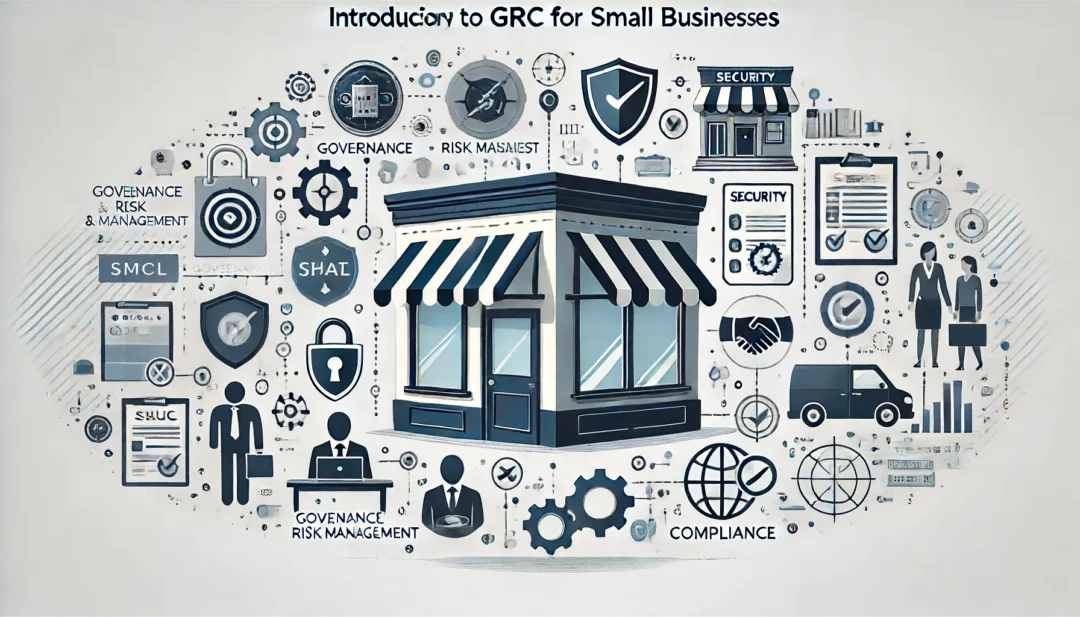
Introduction to GRC for Small Businesses

Mastering GRC: Empowering Small Businesses to Navigate Governance, Risk, and Compliance with Confidence

Introduction

In today’s rapidly evolving digital landscape, small businesses face unique challenges and risks that can significantly impact their operations and reputation. Governance, Risk Management, and Compliance (GRC) provide a structured approach to manage these challenges effectively. For small businesses, adopting frameworks like Cyber Essentials and Cyber Essentials Plus can be a game-changer. These certifications not only enhance security but also build trust with customers and protect the supply chain.

What is GRC?

Governance, Risk Management, and Compliance (GRC) is an integrated approach that ensures an organization meets its objectives, addresses uncertainties, and operates with integrity. Here’s a breakdown of each component:

  • Governance: Establishing policies and procedures that guide the organization’s strategic direction and operational activities.
  • Risk Management: Identifying, assessing, and mitigating risks to minimize potential negative impacts.
  • Compliance: Ensuring adherence to laws, regulations, and internal policies to avoid legal and financial penalties.

Importance of GRC for Small Businesses

Implementing a robust GRC framework is crucial for small businesses for several reasons:

  • Improved Decision-Making: With clear policies and risk assessments, businesses can make informed decisions that align with their goals.
  • Enhanced Operational Efficiency: Streamlined processes and proactive risk management improve overall efficiency.
  • Legal and Financial Protection: Compliance with regulations helps avoid costly fines and legal issues.
  • Building Trust and Reputation: Demonstrating commitment to governance and compliance builds trust with customers, partners, and investors.

Cyber Essentials and Cyber Essentials Plus

Cyber Essentials and Cyber Essentials Plus are UK government-backed certifications designed to help businesses protect themselves against common cyber threats. Here’s a brief overview:

  • Cyber Essentials: A self-assessment certification that helps businesses guard against the most common cyber threats and demonstrate their commitment to cybersecurity.
  • Cyber Essentials Plus: A higher level of certification that includes an independent assessment of the business’s security controls.

Benefits of Adopting Recognized Frameworks:

  • Protection Against Cyber Threats: Implementing these frameworks helps protect the company from the most common cyber attacks.
  • Customer Trust and Confidence: Certifications signal to customers that the business takes cybersecurity seriously.
  • Supply Chain Security: Protecting the supply chain by ensuring that all partners and vendors adhere to high security standards.

What would you do if your business suffered a ransomware attack tomorrow? Do you have a contingency plan in case of a tornado, hurricane, or earthquake? The unexpected can happen anytime, and small businesses can get hit particularly hard.

Small businesses are the backbone of many economies. They are critical for job creation, innovation, and community development. But running a small business comes with significant risks. This includes financial uncertainty, market volatility, and natural disasters.

75% of SMBs cannot operate if they are hit with ransomware.

Thus, small business owners must prepare for the unexpected. This is to ensure their longevity and success. In this article, we will discuss some tips to help small businesses get ready for anything.

Tip 1: Create a Contingency Plan

One of the most critical steps in preparing for the unexpected is to create a contingency plan. A contingency plan is a set of procedures that help a business respond to unforeseen events. Such as natural disasters, supply chain disruptions, or unexpected financial setbacks.

The plan should outline the steps the business will take in the event of an emergency. Including who will be responsible for what tasks. As well as how to communicate with employees, customers, and suppliers.

Tip 2: Maintain Adequate Insurance Coverage

Small businesses should always maintain adequate insurance coverage. This protects them from unexpected events. Insurance policies should include things like:

  • Liability coverage
  • Property damage coverage
  • Business interruption coverage
  • Data breach costs

Business interruption coverage is particularly important. It can help cover lost income and expenses during a disruption. Such as a natural disaster or supply chain disruption.

One of the newer types of policies is cybersecurity liability insurance. In today’s threat landscape, it has become an important consideration. Cybersecurity insurance covers things like costs to remediate a breach and legal expenses.

Tip 3: Diversify Your Revenue Streams

Small businesses that rely on a single product or service are at greater risk. Unexpected events can cause them significant harm. Something like a raw material shortage could cripple an organization without alternatives.

Diversifying your revenue streams can help reduce this risk. It ensures that your business has several sources of income. For example, a restaurant can offer catering services. A clothing store can sell merchandise online as well as its physical location.

Tip 4: Build Strong Relationships with Suppliers

Small businesses should build strong relationships with their suppliers. This ensures that they have a reliable supply chain. This is particularly important for businesses relying on one supplier for their products.

In the event of a disruption, having strong relationships matters. It mitigates the risk of a supplier bankruptcy or supply chain issue. Having supplier options can help reduce the impact on your business.

Tip 5: Keep Cash Reserves

Small businesses should keep cash reserves to help them weather unexpected events. Cash reserves can help cover unexpected expenses. Such as repairs, legal fees, or loss of income. As a general rule of thumb, businesses should keep at least six months’ worth of expenses in cash reserves.

Tip 6: Build Strong Outsourcing Relationships

If business owners try to do everything in house, they’re at higher risk. For example, if a key IT team member quits. In this case, the company could face major security issues.

Build strong outsourcing relationships with an IT provider and other critical support services. If something happens to a company’s staff or systems, they have a safety net.

Tip 7: Check Your Financials Regularly

Small business owners should check their finances regularly. This is to ensure that they are on track to meet their goals and to identify any potential issues early on.

This includes:

  • Tracking income and expenses
  • Creating and reviewing financial statements
  • Regularly meeting with a financial advisor

Tip 8: Invest in Technology

Investing in technology can help small businesses prepare for unexpected events. For example, cloud-based software can help businesses store their data off-site. This ensures that it is safe in the event of a natural disaster or cyber-attack. Technology can also help businesses automate processes. Automation reduces the risk of errors and improves efficiency.

Tip 9: Train Employees for Emergencies

Small businesses should train their employees for emergencies. This helps ensure that everyone knows what to do in the event of an unexpected event.

This includes training for natural disasters, cyber-attacks, and other emergencies. Businesses should also have a plan for communicating with employees during an emergency. As well as ensure that everyone has access to the plan.

Tip 10: Stay Up to Date on Regulatory Requirements

Small businesses should stay up to date on regulatory requirements. This helps ensure that they are compliant with all laws and regulations. This includes tax laws, labor laws, and industry-specific regulations. Non-compliance can result in fines, legal fees, and damage to your business’s reputation.

In conclusion, small businesses face many risks. But by following these tips, they can prepare themselves for the unexpected.

Improve Business Continuity & Disaster Preparedness

Get started on a path to resilience and protect your business interests. We can help you prepare for the unexpected. Give us a call today to schedule a chat.


Featured Image Credit

This Article has been Republished with Permission from .

Paying attention to your customer experience directly impacts your bottom line. Companies that are “customer-centric” are 60% more profitable than those that aren’t. In this digital age, customers also expect more from those they do business with.

In today’s world, people can order something on their phones and see it on their doorstep the next day. Keeping up with expectations means leveraging the right technology.

As 2023 is on the horizon, it’s the perfect time to improve your customer experience. Thanks to cloud technology, you don’t have to spend a fortune to do it. Just put in place some of the applications below. These apps focus on making leads and customers happy.

1. Online Survey Application

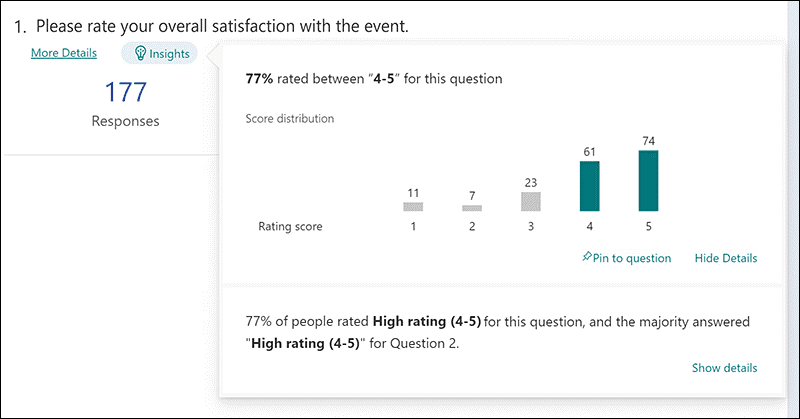
Doing an annual customer satisfaction survey is a great way to check in with customers. Successful businesses take the feedback they get and use it to make their company better.

But doing these surveys through a Word document attached to an email is so last decade! Use an online survey application to make the process seamless for you and your customers.

Online survey tools are available widely online. If you have Microsoft 365, you’ll find one included. These allow people to fill out surveys on any device and not worry about sending them back in an attachment.

On the receiving end, there is no long process of collating data. Just open your form survey tool and see the results instantly.

2. Smart Chat Bot

Most businesses have a limit on how many hours a day they can pay staff to answer questions. Customer service hours are typically the same as business hours. And staff can get busy, which means answers may take longer to send back to an inquiry.

Putting a smart chatbot on your business website can improve customer satisfaction. It allows people to get an answer right away. They can also get that answer any time of day or night.

68% of consumers like chatbots because they give them fast answers to questions. While they can’t answer every single question, they can handle quite a few. For example, in healthcare and banking, chatbots can take 75-90% of questions.

3. Business Mobile App

People tend to live on their mobile phones these days. They carry them with them everywhere. Mobile apps are often the preferred method of connecting with data and businesses. More Google searches are now done via mobile devices than by desktops.

Think about creating a business mobile app. One that allows customers to connect with you to order products and services. You can use it for customer support, to initiate virtual calls, and more.

4. Facebook Messenger Support

Facebook Messenger is the 2nd most popular iOS app of all time. This Facebook-connected application makes it easy to communicate with friends, family, and companies.

Many businesses now use Messenger to connect with leads and provide customer support. When you use an app that is so popular in this way, you make it easier for customers to reach you. The ability to get a quick answer through Messenger can boost a customer’s opinion of your company.

5. VoIP Phone System with Good Mobile App

When customers must juggle different numbers for your staff, it gets confusing. Should they call your sales rep at their desk line or mobile number? Using a VoIP phone system simplifies the entire process.

Employees can have a single number that they use when at their desks, at their home office, or anywhere. Make sure the VoIP service has a good mobile app. One that is easy for employees to use. This ensures they can easily handle customer calls using their smartphone. It also keeps them from reverting to using their personal number.

6. Text Notification Apps

SMS is becoming the new email for many companies. Retailers like Shoe Carnival and World Market have customers opt-in to text messaging. Customers like this for shipping notifications and to get sale and coupon alerts.

There are several services online that you can use for this purpose. Offering text updates can significantly improve your customers’ experience. Use them for appointment reminders, sale notices, or shipping alerts.

7. All-in-One CRM & Sales Platform

One thing that frustrates customers is a disconnect between sales and support. They may have had a conversation with a salesperson to customize an order. Then, find that customer service knows nothing about it.

To streamline the information flow, look for an all-in-one CRM/Sales platform. These are cloud services that offer a CRM module and a sales module, and both connect. There is a single customer record, so all notes from the sales and customer support side are in the same place. Both teams can view all customer interactions.

This improves the customer experience and results in fewer dropped balls. Efficiency and productivity improve as well because everyone is on the same page.

Get Help with Customer-Facing Technology Support

It’s easy to get lost in a sea of different cloud applications. Let us help you navigate to a better customer experience. Contact us today for a free consultation.


Featured Image Credit

This Article has been Republished with Permission from .

One area of cloud computing that is used widely, but often isn’t as flashy as the software side is cloud storage. Storing files in the cloud to make them easily accessible and shareable from anywhere was one of the very first uses of the cloud that was adopted widely by many users.

As advances like automation and AI come to other types of cloud services, like team communications and business apps, cloud storage is not being left behind. The industry also continues to evolve to make storing data in the cloudless complex, more reliable, and better secured.

It’s estimated that in 2021, 50% of all company data was stored in the cloud. This is an increase of 15% from just five years earlier. With today’s hybrid teams that may be working from home and be hundreds or thousands of miles away from co-workers, it’s important to centrally locate files in cloud systems that can be accessed by everyone.

What can you expect to see in the cloud storage market this year? Here are some of the most interesting trends to keep an eye on.

1. Built-in Ransomware Defenses

Ransomware can impact data no matter where it is stored. Whether on a computer, server or in a cloud storage platform, this malware can encrypt the information and make it unreadable to the business that owns it.

In 2021, the average ransomware payment increased by 82% and ransomware incidents rose 64% during the first half of the year. A survey of CISOs found that over the last 18 months, 98% of organizations suffered a cloud data breach.

To combat ransomware, you’ll begin seeing cloud storage services offering ransomware recovery protection. This involves sophisticated systems that can help prevent files from being encrypted by code as well as those that take a copy of files and store it securely away, so files can be restored at the click of a button.

With ransomware showing no sign of stopping, this is a welcome addition in the cloud storage arena.

2. “The Edge” Becomes More Key in Cloud Storage

One of the new buzzwords of the last few years has been “Edge” or “Edge computing.” This means bringing data applications and storage resources geographically closer to the user that needs to connect to them.

As reliance on cloud storage and other cloud applications has increased, so has the need to improve response times from user to server. When data must travel across large distances, it becomes more difficult to quickly and economically deliver the best user experience. Thus, cloud service providers have been moving to an Edge computing model.

What this means for you is better reliability and faster response when accessing or searching on files because your provider is going to work to provide your service from one of the company’s cloud servers that is geographically closer to your location.

For companies with offices spread out around a country or throughout the world, this means that you’ll want to keep service location in mind when signing up for cloud storage and have a discussion with the provider about distance and how Edge computing factors in.

3. Expect More Help from AI and Machine Learning

AI and machine learning are making just about every area of technology smarter. Microsoft Word and text message apps now predict what you might type to help you fill in the blanks and type faster. Programs like Photoshop can crop around a person in an image in seconds using AI.

AI is also going to become more prevalent in cloud storage this year. You can expect help with automatic organization of your files based on your cloud storage patterns. 

Look for features designed to eliminate manual or repetitive tasks to free up more time. This includes AI helping to automate things like provisioning, obtaining, and importing data (known as “ingesting”), managing data retention, and more.

4. Legacy Vendors Begin Offering More Cloud Options

2022 is going to bring more cloud storage options coming from legacy technology providers. For example, Hewlett-Packard Enterprise recently introduced a new Data Services Cloud Console, and Dell Technologies just announced a new APEX multi-cloud design that it is working on to improve the cloud ecosystem.

More cloud storage options mean you may need more help deciding which model will work best for you, as pricing will vary widely. You don’t want to end up with more storage than you need or be paying a lot for a smaller amount of space.

It pays to keep on top of new offerings and understand that every new cloud storage option might not be a fit for your organization’s specific data storage needs.

Get Help Optimizing Your Cloud Storage & Backup Environment

Your business data is what runs your company, and it needs to be stored securely and in a way that’s accessible. Find out how we can help you optimize your cloud storage to improve cost efficiency.


Featured Image Credit

This Article has been Republished with Permission from .